Mount one wall plate per Note, then hang the Notes from the bottom row up. One person can hang a single Note, though a second pair of hands makes a larger array go faster.
What you'll need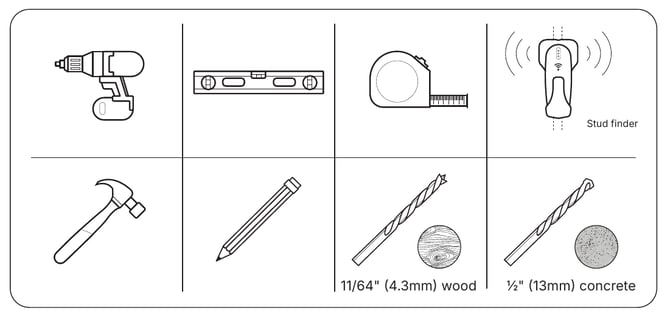
The wall plates, screws, concrete anchors and a Torx insert bit are included.
Before you begin
- Finish the layout and outlets first. See How do I lay out a Note Array with the wall templates? and How do I plan power outlets for a Note Array?
- Check your wall. Each plate has to anchor into wood studs or solid concrete. Wall not quite flat? Mount the plates to a panel first (see below).
| Wall | What it needs |
| Wood studs and drywall | Studs at least 2" × 4" (51 × 102 mm). If a plate spans two studs, they should be 10" to 26" (254 to 660 mm) apart. Drywall no thicker than 5/8" (16 mm). |
| Concrete | At least 8" (203 mm) thick, rated 2,000 psi or more |
| Cinder block | Drill into solid block, about 1" (25 mm) in from its edge. Stay out of the mortar joints. |
| Metal studs or anything else | Add wood blocking that meets the wood stud requirements |
Option: Mount the plates to a panel first
Many installers find it easiest to mount all the wall plates to a single backing panel first, which keeps the alignment exact, and then hang the panel as one piece. The backing material, fasteners and wall attachment are for the installer to choose for the site situation, and may not always be the best option.
- Lay out the templates on the panel and fasten the wall plates to it.
- Cut openings in the panel for outlets and network cables.
- Secure the panel to the studs or blocking behind it, then level it.
- Make sure the panel and its fasteners can carry the full array. See How much wall space does a Note Array need? for weights.
- The panel adds to how far the array sticks out from the wall. In walkways, check local accessibility rules on wall projections.
- Paint the panel to match the wall, or size it to sit just inside the array’s outline so it stays hidden.
The Note Array must be secured to a structure suitable for its total weight. Each Note also needs its own power access and either an Ethernet drop or reliable Wi-Fi at the wall, so plan those before any mounting occurs regardless of whether you are mounting the Notes directly or using a backing panel.
Step 1: Mount the wall plates
Each plate should sit level and fully supported before a Note goes on it.
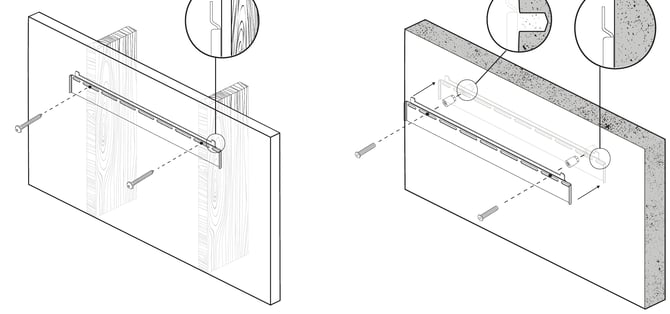
On wood studs:
- Mark the stud center lines, level the plate, and mark the holes on those lines.
- Drill pilot holes at least 2" (51 mm) deep.
- Level the plate again and drive the wood screws with the included Torx bit.
On concrete or cinder block:
- Level the plate and mark the holes.
- Drill at least 7/8" (23 mm) deep and tap the anchors in until they're flush.
- Level the plate again and fasten it with the included screws.
Step 2: Turn off the breaker
Switch off the circuit that feeds the array. Otherwise each Note starts up the moment it's plugged in, which gets busy with a whole wall of them.
Step 3: Connect the cables
Remove the protective film from the top, bottom and sides of the Note. Start with a Note on the bottom row. Plug its power cord into the back, along with an Ethernet cable if you're using a wired connection. The ports sit in a cavity near the bottom right corner. For more on wired setups, see How do I connect my Note to Ethernet?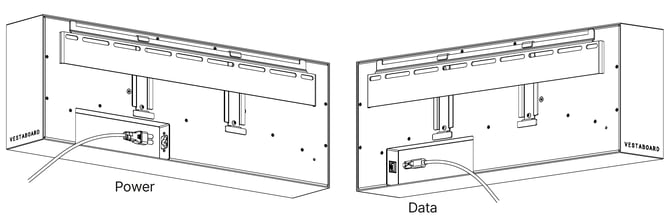
Step 4: Hang the Note
Tilt the Note forward a little, hold it over its plate, and lower it until the rails on the back catch. That motion needs some room above the Note, which is why the top row goes up last.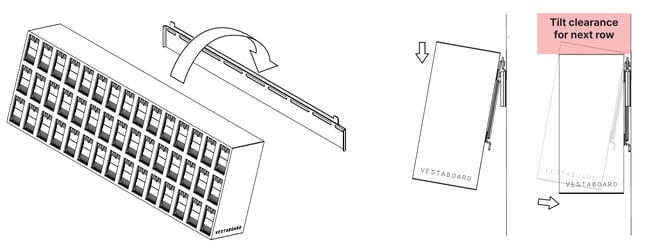
Step 5: Plug it in
Tilt the Note out from its bottom edge and plug its cord into the outlet. Let it settle back against the wall.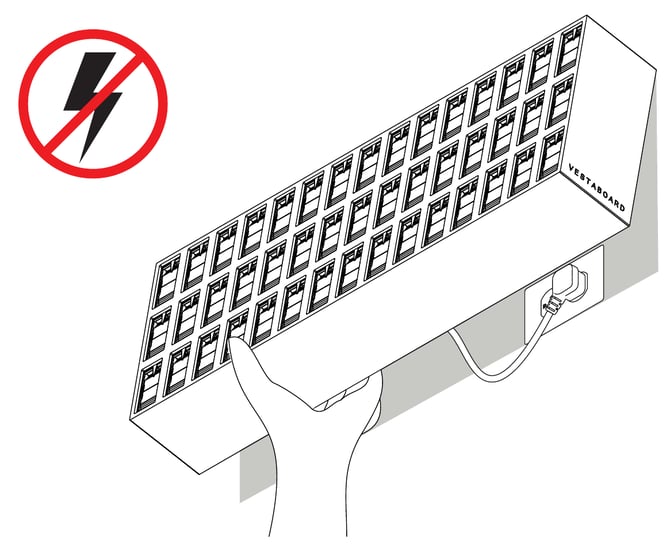
Step 6: Work across and up
Repeat for each Note in the row, checking that every one seats fully and sits flush with its neighbors. Finish a row before you start the one above it. Level the bottom row before moving to the next. Every row above sits on it.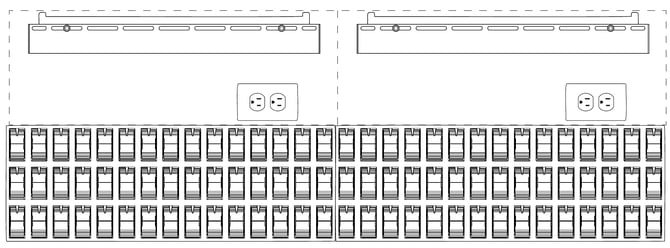
Step 7: Power on and combine
Once the last Note is up, switch the breaker back on. Next, pair each Note and activate your array.