
Every Note comes with a self-adhesive wall template printed at actual size. Overlap them on the wall and you'll see where every wall plate and outlet belongs before you drill anything.
What you'll need
- One wall template per Note (in the box with each Note)
- A level
- A pencil
- A stud finder, for wood-stud walls
Planning before your Notes arrive? Extra templates are at vestaboard.com/note-template
Mounting the wall plates to a panel first? The templates work the same way laid flat. Use the panel's top and left edges in place of the level and plumb lines, and skip the stud lines in Step 4. Level the whole panel when it goes on the wall.
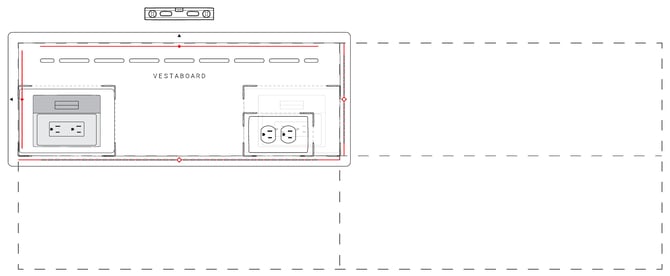
Step 1: Place the first template
- Use the Note dimensions and your row and column count to check the array fits, with room to spare.
- Draw a level line where the top of the array will sit, and a plumb line down its left edge.
- Line up the top-left template with both lines. Peel the backing and press it to the wall.
- Check it's level and plumb before you go on.
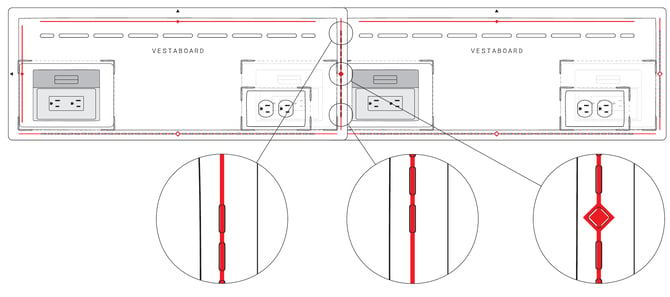
Step 2: Finish the top row
- Work left to right. Slide each new template's left edge under the right edge of the one before it.
- Line up the printed guideline in every cutout, then peel and press.
- Check each template against the top line. Re-check level every two or three templates.
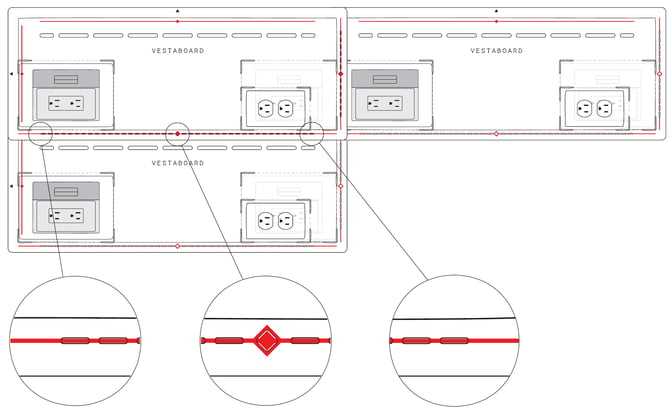
Step 3: Add the rows below
- Work top to bottom. Slide each new template's top edge under the bottom edge of the template above.
- Line up the guideline in every cutout, and match it to the template beside it.
- Peel and press. When every row is up, step back and make sure the grid is square.
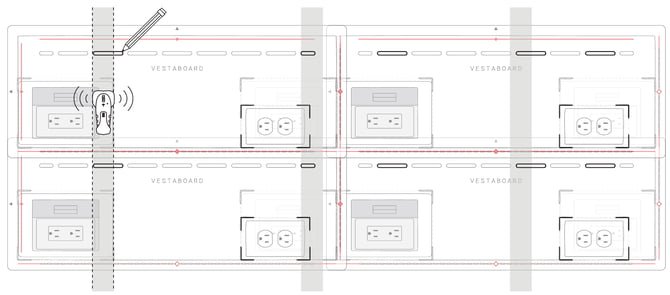
Step 4: Mark the wall and remove the templates
- On wood stud walls, find each stud and mark its center line across the whole array.
- Trace the wall plate cutouts wherever they cross a stud line.
- Mark the outlet locations through the outlet cutouts for the setup you've chosen. See How do I plan power outlets for a Note Array?
- Once everything is marked, peel the templates off.
What's next
Your electrician can install the outlets now. After that, you're ready to mount the wall plates.