
Each Note connects to your network on its own, so a 12-Note array is 12 devices on your network. For a permanent installation, we recommend running Ethernet to every Note.
Ethernet or Wi-Fi?
|
Ethernet |
Wi-Fi |
|
|---|---|---|
|
Reliability |
The steadiest connection, especially in busy spaces |
Good, as long as the signal is strong where the array hangs |
|
What it takes |
One Cat6 line to each Note, run before the Notes go up |
No cabling. Each Note joins your network during setup |
|
A good fit for |
Permanent installations and larger arrays |
Smaller arrays, or walls where new cabling isn't possible |
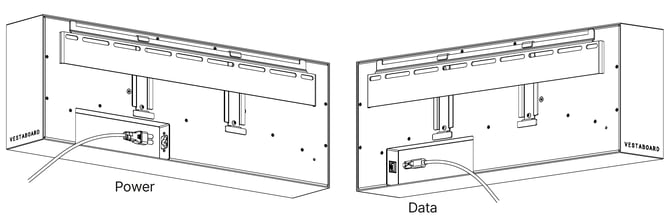
Running Ethernet
- Run one line per Note: Bring a Cat6 cable to each Note's position, with some slack to spare. The port sits in a cavity near the bottom right corner on the back of the Note.
- Run cables before mounting: It's much easier with open wall, and each cable plugs into its Note before the Note is hung.
- Use a switch if you have one network jack: A small switch behind or near the array can connect every Note to a single network drop. Each Note has its own power cord, so a standard switch works and PoE isn't needed.
- Keep everything behind the Notes: Cables and slack should tuck fully behind the array so nothing shows at the edges.
Before installation day
Ask your IT team to confirm the network can take every Note in the array. It helps to tell them how many Notes you're installing, whether they'll be wired or on Wi-Fi, and where the array will hang.
If your network uses a sign-in page or an enterprise login, book time with our team before you start so we can plan the connection with you.