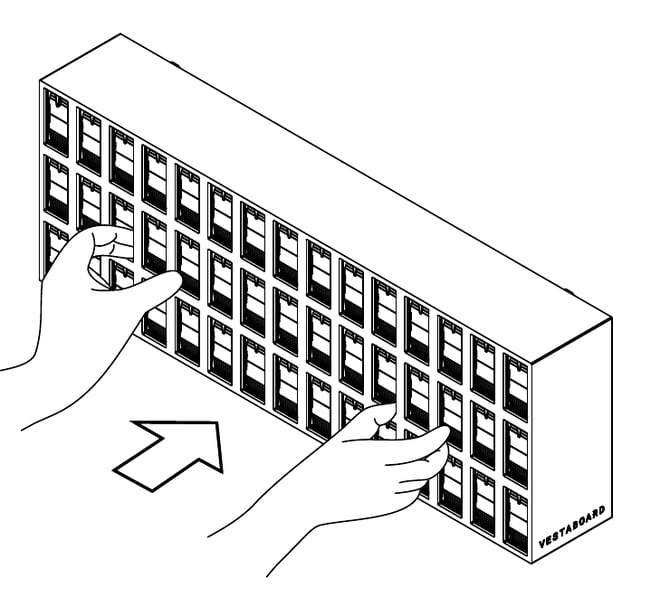
The fascia is the outer shell surrounding a Note's Bits. It's held in place by magnets and pulls straight toward you, even when the Note is in the middle of an array.
You may need to remove the fascia to reseat or replace a Bit or to put a Note into Recovery Mode. You don’t need to remove it to access power or Ethernet cables, which connect from behind the Note.
Before you begin
- Expect a firm hold. The magnets are strong, and the fascia fits closely between neighboring Notes in an array. Use a slow, steady pull rather than a quick tug.
- Remove the protective cover. Peel off the protective cover and any attached label before removing the fascia. There's no need to cut through it.
- Remember to reattach it. A Note won't operate without its fascia in place.
Step 1: Grip the fascia near the center
Place both hands near the center of the fascia, with your fingers gripping the frame between the Bits.
Step 2: Pull straight toward you
Pull evenly until the magnets release. Keep the fascia parallel to the wall to avoid catching on neighboring Notes.
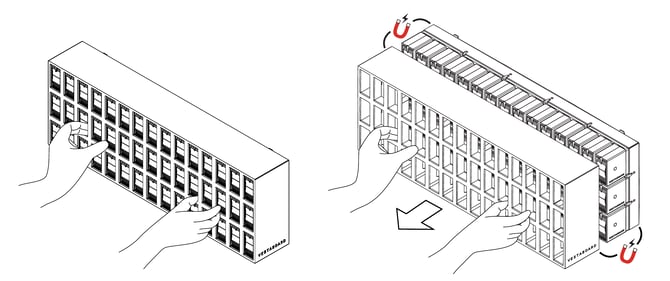
Step 3: Move the fascia clear
Pull the fascia at least 3 inches (8 cm) away from the Bits to fully disengage the magnets, then set it aside.
Step 4: Reattach the fascia
Make sure all Bits sit flush with their neighbors. Align the fascia with the Note and push it straight back into place until the magnets engage.