
A Bit that won't turn is usually unseated. You can reseat or replace it without taking the Note off the wall.
What you'll need
- Two free hands. No tools.
- A replacement Bit, if the original is damaged. See If the Bit is damaged, below.
Step 1: Check that it's flush
Look along the row. If the Bit sits forward of its neighbors, press it gently back into line. If it's flush and still won't turn, keep going.
Step 2: Remove the fascia
Grip the fascia near its center and pull it straight toward you, then set it at least 3 in (8 cm) from the Bits. Full steps are in How do I remove the fascia on a Note in an array?
Step 3: Take out the Bit
- Find the small tab in the Bit's upper left corner and pull it outward until it's fully extended.
- Keep pulling the tab until the Bit comes away from the backplane.
- If it sticks, wiggle it up and down or pull at a slight downward angle.
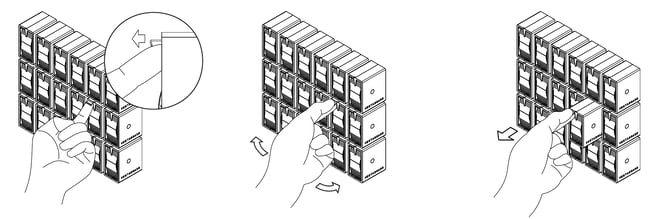
Step 4: Seat the Bit
- With the tab still pulled forward, line up the Bit (or its replacement) and push it in until you feel a soft click.
- Push the tab all the way back.
- Check that the Bit and the Bits around it are flush and seated.
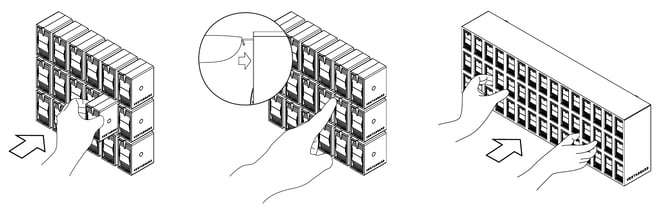
Step 5: Reattach the fascia
Slide the fascia straight on over the Bits until the magnets catch. The Note won't work without it.
Step 6: Restart the Note, if needed
If the Bit still won't turn, try it in a different position, then restart that one Note:
- Tilt the Note out from its bottom edge and unplug its power cord at the outlet. How do I reach the cables behind a mounted Note? shows how.
- Wait 5 seconds, plug it back in, and let the Note settle against the wall.
Use the outlet rather than the breaker. The breaker restarts every Note on the wall.
To check each flap once it's back, run the Bit Character Test linked in How do I remove or replace a Bit?
If the Bit is damaged
File a warranty claim at vestaboard.com/claims. We'll review it and send a replacement Bit.